Danube
Danube is the OS's web browser and the default for links and web pages. Its
module is nixos/modules/danube.nix and its code is in src/danube. It is
WPE WebKit, the WebKit port with no toolkit of its
own, drawn inside a window built from mcsapi's components in derisk's theme.
Danube is only the web view. derisk's command palette is its address bar,
its tab switcher and its list of extensions, and derisk's top bar carries its
menus. It runs Chrome's extensions unmodified, with its own extension
runtime. It also opens the sign-in page of a network that asks for one
first, known as a captive portal, and it loads the content blockers that
system-wide ad blocking compiles.
How it is put together
WPE's headless platform renders each page into a buffer and hands that
buffer over instead of putting it on screen. Danube copies the active tab's
frame into an egui texture and draws it. The window's own interface is small:
a progress line, a permission request's bar, a security key's bar, a
crashed page's notice and toasts. All of it is ordinary mcsapi code with the same components as
derisk's apps, recoloured whenever derisk publishes a new theme to
$XDG_RUNTIME_DIR/derisk/theme.json. Pointer, wheel, touch and key input over
the page goes back to WebKit as WPE events. Typed text goes as one key press
per character, and Ctrl+C, Ctrl+X and Ctrl+V move data between WebKit's
clipboard and the desktop's.
WebKit runs on the process's main thread under GLib's main loop, and the
window runs on a second thread under winit's, in engine.rs and ui.rs. Two
bounded crossbeam channels join them, and nothing is locked. The window
sends commands. WebKit sends events, such as a tab opening, its title, a
frame or a permission request, and asks for a repaint. The window builds its
own picture of the tabs from those events. A frame that does not fit in the
channel is dropped in favour of the next. The other threads are derisk's
menus, later danube runs handing over URLs, and the captive portal's
recheck. They are scoped to the same run and end with WebKit.
There are no Rust bindings for WPE's 2.0 API, so the crate makes its own.
At build time build.rs runs bindgen over the installed wpe/webkit.h and
wpe/headless/wpe-headless.h, allowlisted to WebKit's and WPE's symbols and
the few GLib calls Danube uses, and ffi.rs includes the result. Every
signature and enum value comes from the library itself, so a WebKit update
that changes one fails to compile instead of failing at runtime. webkit.rs
wraps the objects in types such as Display, WebView, View, Toplevel,
Settings, NetworkSession and FilterStore. Each type owns one reference
and gives it back when dropped, offers the calls as methods, and takes
closures for signals, which GObject frees with the connection. engine.rs
holds only the tab logic on top of them and has no unsafe in it.
nixpkgs has only WebKitGTK, so nixos/pkgs/wpewebkit.nix builds the WPE port
from the WPE release of the same WebKit version, with nixpkgs' WebKitGTK
patches. It builds only the WPEPlatform API, with the headless and Wayland
platforms. No upstream cache has it, so CI compiles it once per architecture
and keeps it in the project's cache.

The window
The window is the page and nothing else. It has no toolbar, no address bar and no tab strip. derisk's command palette manages addresses, tabs and extensions, and derisk's top bar shows Danube's menus. The window's title names the tab in front. Over the page the window draws only what has to be there:
- a progress line along the top while a page loads;
- an extension's popup in the top right corner;
- a bar for a site's permission request;
- the find bar, along the bottom, while it is open;
- a notice on a page whose web process died;
- the link under the pointer.
A phone window, one whose short side is under 600 logical pixels as in GTK and Qt on a phone, sends a mobile User-Agent string with "Android" and "Mobile" in it. Sites then serve their phone version from the next page loaded.
The palette is the address bar. Ctrl+L or Alt+D in Danube asks derisk to
show it. Text typed there that reads as a web address, such as
example.com, localhost:8080 or a full URL, opens in a new Danube tab. For
anything else, the palette searches with the desktop's search engine, which
the choice screen and Settings, Default apps pick.
Danube has no search setting of its own.
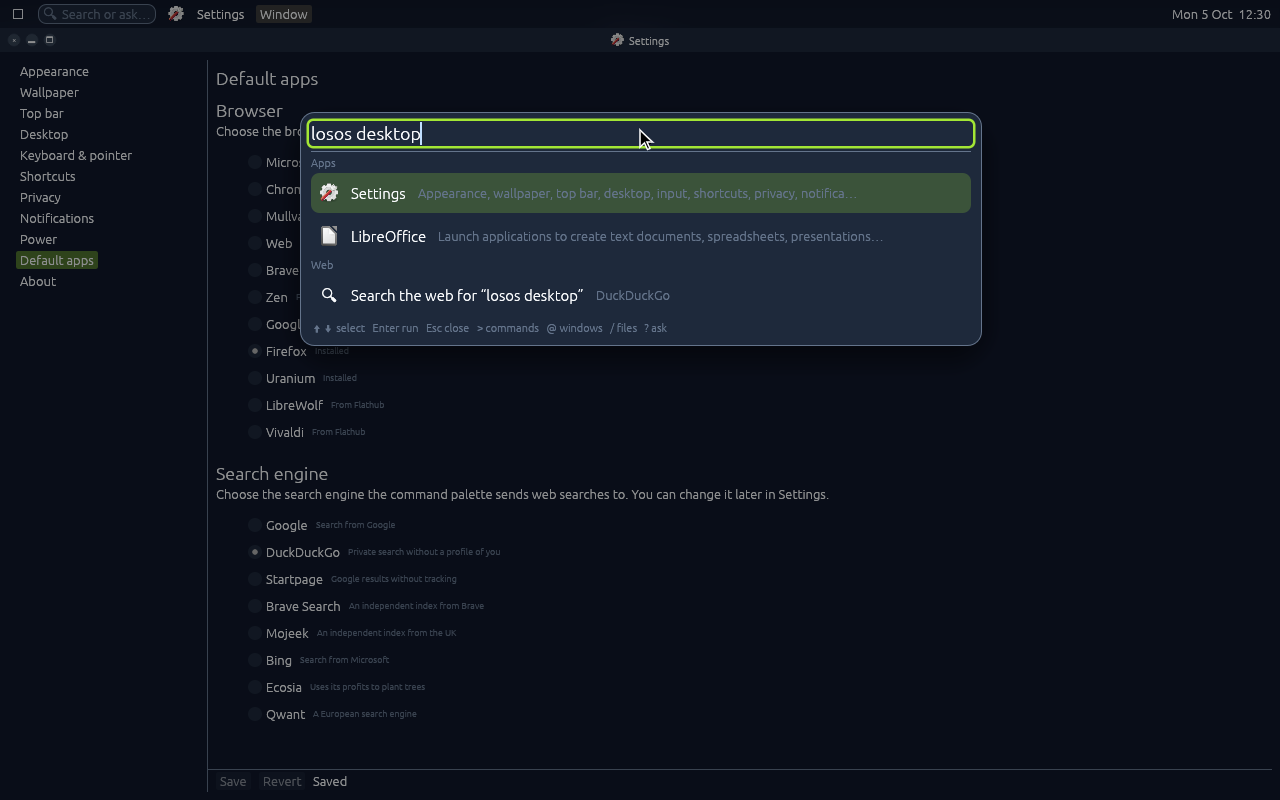
The palette's Tabs and Extensions headings come from derisk's bundled
browser plugin, a WebAssembly palette plugin like its other sources. The
plugin shows what Danube registers with register_palette on the agent
socket. That registration lists the tabs, with each one's id, title, URL and
whether it is active, and the extensions, with each one's id, name, whether
it is enabled and whether it has options. Danube sends it again whenever
anything changes. When the person picks an entry, it comes back as a
palette event with a command. activate_tab, close_tab and new_tab do
what they say. open carries the http(s) URL derisk made from the typed
text, with https:// for a bare host and http:// for localhost, and Danube
opens it in a new tab. enable_extension, disable_extension and
extension_options also do what they say. An older derisk without the
plugin refuses the registration, and the menus below still list the tabs.
The menus are derisk global menus. They appear in the top bar and in the command palette, where "Tabs › Wikipedia" switches to that tab and "Close Tab › Wikipedia" closes it:
- Page has the address, "Secure" or "Not secure", and how many of system-wide ad blocking's filter sets are in force. The top bar shows these lines and the palette leaves them out. Then come Open Address, which opens the palette, Copy Address, and Find in Page.
- Tabs lists each tab by its title, then New Tab, Next Tab and Previous Tab.
- Navigate has Back, Forward, Reload and Stop.
- Bookmarks has Bookmark This Page, or Remove Bookmark on a page that has one, then each bookmark by its title.
- History lists the fifteen pages visited last, newest first, then Clear History.
- Close Tab lists each tab by its title.
- Extensions has each extension's button, meaning its popup or what it does when clicked, its options page, and Enable or Disable.
Danube registers them over derisk's agent socket,
$XDG_RUNTIME_DIR/derisk/agent.sock, and finds its window by app id,
org.losos.Danube, and title. It sends them again whenever a tab opens,
closes, or changes its title, address or security. Outside a derisk session
there is no palette and no menus, and only the keyboard reaches the tabs.
| Keys | Action |
|---|---|
| Ctrl+L, Alt+D | The palette |
| Ctrl+T | A new tab, and the palette for its address |
| Ctrl+W | Close the tab |
| Ctrl+Tab, Ctrl+Shift+Tab | The next and previous tab |
| Ctrl+R, F5 | Reload |
| Alt+Left, Alt+Right | Back and forward |
| Ctrl+F | Find in the page |
| Ctrl+D | Bookmark the page, or remove its bookmark |
A middle click on a link opens it in a tab behind the current one. An
extension's own shortcuts from its manifest's commands work too, such as
Bitwarden's Ctrl+Shift+L to fill a login, and Esc closes its popup.
Downloads go to ~/Downloads and never overwrite a file there.
Downloads explains how they are fetched and shown.
Finding text
Ctrl+F, or Find in Page in the Page menu, opens the find bar along the bottom of the window. Typing there highlights every match in the page, ignoring case, and scrolls to the first; the bar says how many there are, up to a thousand. Enter and Next go to the next match and Shift+Enter and Previous to the one before, wrapping round the page. Esc or Close takes the bar and the highlights away, wherever the keyboard is. Switching tabs with the bar open searches the new tab for the same text, and a page that navigates or reloads is searched again once it has loaded.
History and bookmarks
Every page a tab finishes loading goes in the history, newest first, once
per address, up to a thousand pages. A page's title is taken when it
arrives, which is often after the load. Only pages from the web and local
files count: not a new tab, an extension's page or the captive portal's
sign-in. The bookmarks keep the order they were added in. Both live in
~/.local/share/danube, as history.json and bookmarks.json, written
whole to a new file that replaces the old one whenever they change.
The History and Bookmarks menus show them, so the command palette searches them as it does every menu: typing part of a bookmark's title finds it. Picking one loads it in the tab in front. Clear History empties the history and leaves the bookmarks. The captive portal's window and a page shown as the desktop background keep neither.
Uploading files
A page's file upload button opens the desktop's file chooser, through the
file chooser portal, org.freedesktop.portal.FileChooser. Several files can
be chosen where the page allows it, and the page's accepted types are the
dialog's first filter, with every file as the second, since a page's list is
only a hint.
The sandbox shows Danube nothing of the home directory beyond its own
folders and Downloads, so a file chosen anywhere else has to be handed in.
The portals do that for a sandboxed app through the document portal: the
chosen file appears under $XDG_RUNTIME_DIR/doc, which inside Danube's
sandbox is the document portal's view for org.losos.Danube and holds only
the files the person chose for it. Danube's web processes read them from
there too.
The portals recognise a sandboxed app as they recognise a Flatpak. The
process on the other end of the app's bus connection, which is its
xdg-dbus-proxy, has a /.flatpak-info at its root naming the app and an
instance, and $XDG_RUNTIME_DIR/.flatpak/<instance>/bwrapinfo.json names
the sandbox's process. Danube starts its proxy in a small sandbox of its own
carrying that file, writes bwrapinfo.json when its own sandbox starts, and
removes it when it ends.
Site notifications
A site that the person allowed to show notifications (see Sites' permissions) shows them on the desktop, through derisk's notification server, as downloads do. Each one says which site sent it on its last line, so a page cannot pass its words off as the system's. Clicking it brings its tab to the front and runs the page's own click handler. Dismissing it runs the page's close handler, and a page closing its own takes it off the desktop. A notification with the tag of one still shown replaces it. Without a notification server, the text shows as a toast in the window instead.
Downloads
WebKit decides what counts as a download: a response it cannot show, a link
with download, or an extension's downloads.download. Once the response
has arrived, Danube names the file, using the server's name or the
extension's. For a plain GET over HTTP or HTTPS, it then stops WebKit's
transfer and hands the file to aria2, in
src/danube/crates/danube/src/downloads.rs. aria2 requests the final
address, after WebKit's redirects, with what WebKit would have sent. That
means the cookies WebKit's jar holds for it, HttpOnly ones included, the
request's Referer, and the window's User-Agent. It splits the file over one
connection per hardware thread with split, up to 16 to one server, which
is the most aria2 allows with max-connection-per-server. Each range is at
least 1 MiB. A server that caps each connection's speed then delivers the
file that many times faster. A server that does not answer range requests
gets one connection, as before.
One aria2c runs per browser. It starts with the first download, inside
Danube's sandbox, so it can reach the network and ~/Downloads and nothing
else in the home. Danube talks to it over JSON-RPC on a loopback port, with
a random secret. aria2 reads the secret from a file only the user can read,
in the sandbox's private /tmp, and the file is removed once aria2 answers.
The secret never appears on aria2's command line.
aria2 stops with Danube (--stop-with-process), and a download Danube had
not finished is removed with it.
WebKit keeps the downloads aria2 should not take: a POST's answer, a blob:
or data: URL, and an extension's own pages. It also takes over any
download aria2 failed on before the first byte, such as one behind a login
that only the page's session knows. It asks again from the same tab, so the
tab's cookies go with the request. If aria2 could not be started at all,
WebKit takes every download from then on.
Each running download shows as a desktop notification with the file's name,
how much has arrived out of the total, the speed, aria2's connections, a
progress bar and a Cancel button. The notification is resident with no
timeout, so it stays until the download ends. It updates in place at most
once a second. At the end it is replaced one last time by a notification
saying the download finished, failed or was cancelled, and the server lets
that one expire. If the person closes the notification while the download
runs, it does not come back until the download ends. derisk serves the
notifications. When there is no notification server on the bus, Danube
reports how each download ended in a toast instead.
Extensions
Danube runs Chrome's extensions, Manifest V2 and V3, as they come from the
Chrome Web Store, and Firefox extensions written to the same API. WPE WebKit
has no extension runtime of its own, because WebKitGTK and WPE leave that to
the browser. Danube's runtime is in src/danube/crates/danube/src/extensions.
Bitwarden's Chrome extension, unmodified, signs in to a self-hosted server,
unlocks, and fills a login from its popup, from Ctrl+Shift+L and from its
menu in the page's field.
danube install-extension bitwarden.crx   # a .zip, .crx, .xpi or a directory
danube list-extensions
danube uninstall-extension nngceckbapebfimnlniiiahkandclblb
These commands run outside the sandbox, because the file can be anywhere,
and tell a running Danube to load the change. Each extension is unpacked
into ~/.local/share/danube/extensions/<id>/. The id is the one Chrome
would give it, taken from the key in its manifest or its .crx header, so
the extension keeps the id its server knows. It keeps its storage as JSON
files in ~/.local/share/danube/extension-data/<id>/.
~/.config/danube/extensions records which extensions are turned off. The
Extensions menu and the palette's Extensions heading turn each one on or off
and open its options page.
How an extension runs:
- Its files come from Danube's own
chrome-extension://<id>/scheme, each page with the manifest's content security policy. A web page may load only the files the manifest lists inweb_accessible_resources. WebKit lets a page's frame reach them because Danube puts those files on each tab's CORS allow list. - Its background is a hidden web view. That is either a background page, or a service worker run as a page, since WebKit has no worker to give an extension. Its popup and any offscreen document are hidden web views too. The popup's frames go to the window, which draws them over the page and sends the popup the pointer and keys.
- Its content scripts are WebKit user scripts in the extension's own isolated world, and its CSS goes in as user style sheets. Each tab has its own content manager, so Danube knows which tab a message came from without the page saying.
chrome.*andbrowser.*come fromapi.js, which runs first in every one of those contexts. Each call is a script message to the runtime on WebKit's thread, which answers it. The runtime covers messaging and ports, tabs, storage, scripting, alarms, the action's popup and badge, commands, i18n, downloads, notifications as Danube's own toasts, and offscreen documents. WebKit's own calls into a page reach only its main frame. So a context collects what it has to be told, such as a message or an event, by sending a message that the runtime answers only once there is something to deliver.- A sandboxed page in a web page's frame, such as Bitwarden's menu in a login field, has an opaque origin, and WebKit lets such a page load nothing from the extension's scheme. Danube serves that page with its scripts and style sheets written into it, and adds the scripts' hashes to its policy. When the page switches to another style sheet, such as a theme, Danube swaps in the same file written inline.
What an extension cannot do here:
- See or change requests.
webRequesttakes listeners and never calls them, anddeclarativeNetRequestkeeps no rules. Blocking is system-wide ad blocking's job. - Talk to a native program with
runtime.connectNative, so Bitwarden cannot reach its desktop app for biometric unlock. - Run in a page's own world,
world: "MAIN", anywhere but its main frame. - Reach another of its views.
extension.getViews()is empty andgetBackgroundPage()is null, since each view is a separate web process. - Use
cookies,contextMenus,history,bookmarks, the side panel oridentity, which answer as if empty or fail. - Fetch one of its own files from a content script unless the manifest lists it as web-accessible, which a page could not do either.
Sites' permissions
Danube denies a page's request for any of these unless the person allows it:
the camera, the microphone, the screen, location, notifications, the
clipboard, pointer lock, the list of devices, protected (DRM) media, and its
cookies on other sites. Danube asks in a bar over the page, for that site,
once or remembered. Remembered answers are lines in
~/.config/danube/permissions, in the form host kind allow|deny, which the
person can edit or delete.
Security keys
WebKit builds its own Web Authentication only for Apple's ports, so on Linux
a page finds no navigator.credentials and cannot ask for a security key.
Danube adds it in webauthn.rs, so a site such as Proton, GitHub or a bank
can register a key and sign in with one:
webauthn.jsruns in the page's own world of the top frame before the page's scripts. It definesnavigator.credentials.createandget,PublicKeyCredentialand its responses as the specification has them, and only on a secure page, which is HTTPS orlocalhost.webauthn-bridge.jsruns in a world of Danube's own in the same frame, which is the only place the message handler exists. It passes each call on and the answer back. A frame inside the page has no bridge, so an embedded site cannot ask in the top site's name.webauthn.rschecks the call against the address WebKit has for the tab, never against what the page says about itself. The relying party must be the page's host or a domain it is under, and never a public suffix such asco.ukorgithub.io. Then Danube builds the client data the key signs and talks CTAP2, or CTAP1 for an old U2F key, to every key on USB. It uses Mozilla'sauthenticatorcrate, the code Firefox uses.
A bar over the page names the site and asks the person to touch their key. When the key wants its PIN, the bar has a field for it and says how many tries are left. Cancel stops the request, and so do closing the tab or leaving the page. The key's make and model reach the site only when the site asks for attestation; otherwise Danube removes them, as the specification allows. Danube has no key of its own built in and does not offer passkeys in autofill, so a site that asks for a platform authenticator is told there is none.
The browser's sandbox has no /dev from the host. A key's device node
appears there when the key is plugged in, and a bind made when the sandbox
starts cannot follow it. Binding the whole of /dev would give the browser
every device the person may open. So the launcher, the danube process
outside the sandbox, asks the keys. The sandbox gets one socket,
$XDG_RUNTIME_DIR/danube-keys, and over it the browser sends each request
with the tab's address, and then the PIN and Cancel the person gives. The
launcher checks the request again before any key hears of it.
In a machine, the keys are the host's, which losos-tokens lends to every machine.
Captive portals
danube captive-watch is a user service in every session. It reads
nmcli monitor and rechecks the network whenever NetworkManager reports a
change and says the machine is connected. The check fetches GNOME's
http://nmcheck.gnome.org/check_network_status.txt over plain HTTP, which a
portal intercepts. The request carries the request line, the host and
"Danube" as the User-Agent, and nothing else. Any answer other than a 200
saying "NetworkManager is online" means a portal. Then it opens
danube --captive-portal, one window titled "Sign in to network" with no
tabs, a profile that ends with the window, and no content blockers, since a
portal's page is often built from what they block. That window checks again
every three seconds and closes itself once the network lets traffic through.
The desktop entry's "Sign in to network" action opens it by hand.
The desktop background
derisk can show a web page as the desktop background, chosen in Settings,
Wallpaper, "Web page", and Danube draws it. derisk starts
danube --background URL --size WIDTHxHEIGHT --scale S at the screen's size,
the same way it starts ffmpeg for a video wallpaper, and reads frames from
Danube's stdout. For every frame the page renders, Danube writes a width and
a height as 32-bit little-endian numbers, then that many premultiplied RGBA
pixels. The code is in src/danube/crates/danube/src/background.rs. There is
no window. Any http://, https:// or file:/// address works. A local
page can load the pictures and scripts beside it, because the sandbox shows
its folder read-only.
The page gets nothing of the person's. It has a profile that ends with it, no
extensions, every permission refused, no sound, and no keyboard or pointer.
It gets the content blockers like any tab. When a window covers the screen,
or in low power mode if the Settings app chooses, derisk writes hide on
Danube's stdin. WebKit then stops painting the page and slows its timers, and
Danube pauses the page's CSS animations, videos and sounds, which WebKit's
compositor would otherwise keep running. show resumes exactly those. If
derisk has not read a frame yet, the next frame replaces it instead of
queueing behind it. A load that fails, or a web process that dies, ends the
run with the reason on stderr, and derisk shows its own background instead.
Danube's stdout carries only frames, and the web processes it starts write
their output to stderr.
Sandbox and hardening
Danube uses two sandboxes, both built with the
Hakoniwa crate in
src/danube/crates/danube-sandbox.
-
The browser. When started outside the sandbox,
danubebuilds a container and runs itself again inside it. The container has:- its own user, mount, PID, IPC and UTS namespaces;
- the Nix store,
/etc, the GPU driver and sysfs, read-only, and/dev/dri; - an empty home where only
~/.local/share/danube,~/.cache/danube,~/.config/danubeand~/Downloadsare writable, and the user's fonts, icons and derisk's settings are visible read-only where they exist; - an empty runtime directory with only the Wayland, PipeWire and
PulseAudio sockets, derisk's directory, the document portal's view for
Danube as
doc(only files the person chose to upload), and the launcher's socket for security keys; - the session bus through xdg-dbus-proxy, which lets through only the
desktop portals, notifications and the accessibility bus. The proxy
runs in a small sandbox of its own, with only the Nix store,
/etcand the runtime directory, and the/.flatpak-infothat tells the portals which app is asking (Uploading files).
A seccomp filter denies the system calls Flatpak denies, such as keyctl, ptrace's relatives, kexec and bpf, except the namespace calls the next sandbox needs. There is no Landlock ruleset at this level. A process under Landlock can neither mount nor write its user namespace's uid map, and the next sandbox is built inside this one using both. The network is the host's, since WebKit's network process needs it.
-
Each web process. WebKit puts every web process in its own sandbox, built with bwrap upstream. One patch in
nixos/pkgs/patches/wpewebkitlets the embedder name a launcher that takes bwrap's arguments. Danube namesdanube-sandbox, which reads the arguments WebKit gives and builds the same sandbox with Hakoniwa. It uses WebKit's own filesystem layout and its seccomp filter, loaded last, and carries in the file descriptors WebKit hands over. Landlock then lets the web process read what that layout shows and write only where WebKit made it writable. Paths that do not exist are left out of the rules, because Hakoniwa refuses to start with a rule for a missing path, and a machine may have no/dev/dri. A bind is also left out when an earlier bind of the same path already shows it, such as the D-Bus proxy's binary inside the Nix store, because Hakoniwa cannot place a file bind over a file it may not write. An argumentdanube-sandboxdoes not recognise is an error, so if a WebKit update asks for more, its web processes fail to start instead of running with less protection.
WebKit is built with level-3 fortify checks, stack clash protection, zeroed
automatic variables, eager binding so the whole GOT is read-only, and
control-flow protection where the CPU has it, which is CET on x86_64 and BTI
and PAC on aarch64. WebDriver, the remote inspector and WebKit's unshipped
experimental features, WebXR among them, are not built. JavaScriptCore's JIT
compilers are off by default with JSC_useJIT=false. Scripts and
WebAssembly run in its interpreters, which is slower, but a page can no
longer make the browser write and run machine code, which most WebKit
exploits rely on. javascript.jit = true in the user's settings turns the
JIT back on. WebKit keeps its own allocator, libpas with its Gigacage, for
JavaScript and DOM objects. Everything else it allocates through malloc,
which is hardened_malloc wherever it runs, as the allocator
describes. Tracking prevention, WebKit's ITP, is on, and there is no keyring
for WebKit to save passwords in.
The sandboxes need unprivileged user namespaces, which NixOS's kernel allows. A phone's own kernel may not: see what is not done.
Settings
Settings live in the user's ~/.config/danube/settings.conf, one
key = value per line. A key left out keeps its default. There are no NixOS
options for them. losos.danube.home and losos.danube.jit used to write
/etc/danube/settings.conf under it, and they were removed because nothing
set them.
| Key | Meaning |
|---|---|
home | What a new tab opens (an empty page by default) |
javascript.jit | true turns JavaScriptCore's JIT compilers on |
downloads.aria2 | false leaves downloads to WebKit's own downloader, one connection each (on by default) |
downloads.connections | How many connections aria2 splits a download over (one per hardware thread by default; at most 16 go to one server) |
There is no search key, and losos.danube.search went away with the
address bar. The palette searches with the desktop's engine.
What it replaced
Danube replaced Uranium, which was ungoogled-chromium under the OS's name.
Uranium came with a launcher that turned it into Chrome for Android on a
phone, five patches and a rebranding script for a build CI could only compile
in rounds in uranium.yml, a Flatpak of it served from the proxy, and
uranium-tabs, a native messaging host that mirrored its tabs into derisk's
menus. Chromium draws its own interface with its own toolkit, so it could
never be an mcsapi window or follow derisk's theme. It is not coming back.
Profiles do not carry over: Danube starts with a new one in
~/.local/share/danube, and a user's own ~/.config/mimeapps.list that
names uranium.desktop has to name org.losos.Danube.desktop instead.