The installer
The pm tree's installer was systemd-sysinstall, new in systemd v261.
nixpkgs 26.05 shipped 260.4, so the installer does the same job by hand with
the same tools. nixos-unstable now carries 261, so sysinstall is available,
but the installer has not moved onto it yet. The installer is its own small
live system, nixos/installer/, on its own ISO, and
nixos/modules/installer.nix evaluates it from the OS's configuration.
A machine that keeps Windows uses the Windows installer instead, which installs the same release beside it.
Under UEFI, the ISO's appended FAT partition holds GRUB as
EFI/BOOT/BOOT<ARCH>.EFI, which chainloads the installer's UKI from the ISO
9660 filesystem. On x86_64 a legacy BIOS starts it too, through GRUB, from a
disc or a USB stick. Either way, GRUB's menu and the Plymouth
splash after it look the same as on an installed system and
say "LosOS Desktop installer". The initrd then mounts the ISO by its volume
label, and the Nix store from a squashfs on it.
The live system runs NetworkManager with NixOS's defaults, as the installed
system does. NetworkManager runs DHCP on every wired port, built in or USB,
as soon as a cable is plugged in, at boot or later, and prefers it over
Wi-Fi when both are up. A machine with a cable in is online without being
asked anything. Otherwise derisk scans for a Wi-Fi network and joins it
through NetworkManager with nmcli. Of the firmware NixOS would add, only
linux-firmware is on the medium, because most Wi-Fi cards do not start
without it, and the NVIDIA driver's GSP firmware when a supported card is
present. The live medium also runs the same losos-hardware rules and open
NVIDIA stack as an installed session (nixos/installer/drivers.nix,
Drivers), so Turing-and-newer cards such as a GTX 16xx are not
left on nouveau while derisk runs the GLES compositor.
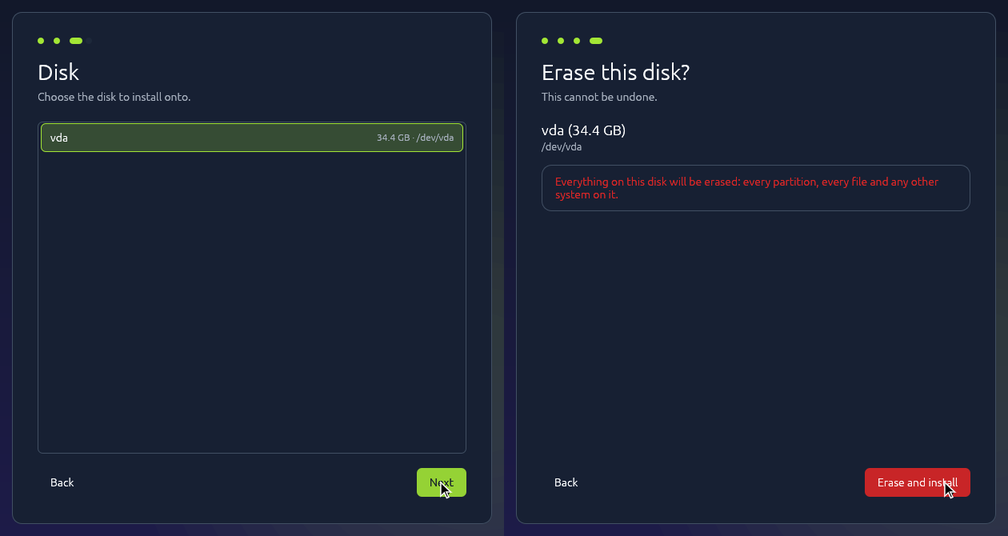
The installer is derisk installer on tty1, a logind session run as root,
with a root shell on tty2 for anything it does not cover. It draws the same
pages first-boot setup uses, so it works with a mouse, a touchscreen or a
phone-sized screen. It starts losos-installer serve, from
src/losos-installer, as its backend and talks to it in JSON lines on stdin
and stdout. derisk owns the screen and the network, and the backend owns the
disks. The Network page shows each wired port as having no cable, getting an
address, or online, and is skipped when the machine is already online. Then
the backend lists the disks. It leaves out the disk the ISO booted from and
refuses any disk it did not list. Before anything is touched, the installer
names the chosen disk, its size and the source once more, behind an "Erase
and install" button. Then:
- The installer releases anything still using the chosen disk (swap, mounts, active volume groups and open LUKS devices on it), wipes the disk's old partition table and tells the kernel to forget its partitions. The kernel still refuses while something on the disk stays busy, and that stops the install before anything is written. This step matters because repart adds the new ESP to the kernel itself to format it, and it could not do that while the kernel still knew an old partition with the same number.
systemd-repart --empty=forcelays out the ESP, with GRUB and an emptygrubenvcopied in, a BIOS boot partition for GRUB on x86_64, and both/usrslots at full size, labelled_empty. sysupdate refuses a disk with only one slot. These aredisk.nix's own definitions, so the disk is laid out the way the installed system expects to find it.- The installer pulls the versioned OCI release artifact directly from
GHCR with
oras, preferring itsinitial-update.tar.xzlayer. If that exact artifact is not published (for example, for a branch build), it pulls the channel's current artifact instead. The archive contains the signedSHA256SUMS, its signature and the update payloads. Payloads that are not already XZ files are compressed individually before the contents are bundled into the XZ archive. The installer stores the archive on an ext4 scratch partition created in the target disk's free space, then extracts to that same partition and unwraps each additional XZ layer there, rather than using tmpfs or buffering update files in RAM. It verifies the signed manifest and every resulting file beforesystemd-sysupdate updatewrites the slots, using the same transfer definitions asupdate.nix, aimed at the chosen disk instead ofautoand at the new ESP, mounted under/run/losos-installer. On x86_64,losos-grub-bios-installthen writes GRUB into the MBR and the BIOS boot partition, so the disk starts on a legacy BIOS as well. - The machine reboots into the installed system. Its first boot creates
root,
/homeand swap fromdisk.nix, the same way an image written withdddoes. With a PIN at startup, the installer has made them already, root encrypted.

So an install is an update into an empty slot, from the newest complete release on the channel configured in the ISO. A nightly ISO installs the newest nightly; a weekly ISO installs the newest weekly. The installed system then follows its configured channel. The medium carries no copy of the OS.
The installer pulls the architecture-specific OCI artifact from GHCR with
oras, without a hosted proxy or GitHub release-asset downloads. CI publishes
each version as images:<channel>-<version>-<arch> and moves
images:<channel>-<arch> to the latest complete artifact. The installer
prefers the ISO's exact version and falls back to the current channel artifact
when that version is not published (as with branch builds). The OCI artifact
contains both the individual release layers used by the update proxy and an
initial-update.tar.xz layer for a fresh installation.
The initial archive carries the architecture-specific SHA256SUMS and
SHA256SUMS.gpg, plus only the files selected by the sysupdate transfer
definitions. Payloads are XZ-compressed individually before being bundled
into the XZ archive; existing .raw.xz images retain their compression.
The installer streams the archive listing to validate that it contains only
the expected flat regular files, then extracts onto the target disk's scratch
partition and decompresses in place. The archive is removed before the
additional XZ layers are expanded, avoiding tmpfs and a second full copy in
RAM. It verifies the original payload hashes and signed manifest before
sysupdate writes the initial version. The scratch partition and every staged
update file are removed when installation completes, including after an
installation error. Subsequent updates continue to use the machine's
configured channel.
The files must be stored before sysupdate can read them: /usr is over 3 GiB,
and the live system's memory cannot hold it on every machine. The disk being
installed has the room. Until the first boot creates root, /home and swap,
everything after the /usr slots is free. So repart adds an ext4 partition
labelled losos-download there, sized for the selected files plus some room,
and ORAS fetches the needed OCI layers into it. Once sysupdate has written the
slots, the installer wipes and deletes the partition, so the first boot finds
the free space it expects.
The installed system then updates from the channel like any other. The
repository comes from GITHUB_REPOSITORY in CI, as
losos.release.repository, so a fork's ISO reads the fork's releases. The
image used to be its own installer, with a second UKI that booted it into a
tmpfs root and copied its own /usr with CopyBlocks=. That is gone, along
with the losos.install condition it needed in disk.nix. When nixpkgs
reaches v261, the installer should be compared against systemd-sysinstall
again.
A machine that cannot reach the channel installs from a release disk
instead. That is any filesystem labelled LOSOS-RELEASE that holds a
release's SHA256SUMS, SHA256SUMS.gpg and the /usr, verity and UKI files
they list. udev mounts it at /run/losos/release whenever it appears, and
the installer then turns the transfers' sources into local files. sysupdate
verifies signatures only on downloads, so the installer checks the release
first. It checks SHA256SUMS against the signing key with gpg, as
systemd-pull does, then checks every file on the disk against its line
there and refuses any file not listed. The release disk is for a VM on a
network that re-signs TLS with its own authority, where the channel's
certificate never verifies. With the disk attached, the installer does not
need the network at all. The backend's hello names the disk as release,
and derisk then skips its Network page.
Asking for a PIN at startup
Without a PIN, root is plain ext4. A person's home is encrypted by
systemd-homed, but /var is not, and the machines' disks live in it, so a
stolen PC gives up every machine's disk and the journal. A PC with a TPM 2.0
that starts from UEFI is offered more: the installer's PIN page, after the
disk, has a box to encrypt the system's data and ask for a PIN at every
start. It is off unless ticked. A legacy BIOS PC, or one without a TPM, is
not offered it, because its boot measures nothing the TPM could unlock
against; the backend's hello says "encryption": true only where it can.
With the box ticked, the PIN goes in the install request, never on a
command line, and the install gets one more step after the download. The
scratch partition is gone by then, so the installer makes root, /home and
swap itself, from disk.nix's own definitions plus one drop-in,
30-root.conf.d/encrypt.conf, that makes root LUKS2 locked to the TPM, and
swap from the same losos-swap the first boot runs. repart can lock a
volume to the TPM but cannot give it a PIN, so its slot is only a step.
systemd-cryptenroll adds a recovery key, then a TPM slot that needs the
PIN, then removes repart's. The first boot finds every partition it would
have made already there and leaves them be, and
systemd-gpt-auto-generator unlocks root through the TPM, which asks for the
PIN on the boot splash. boot.initrd.luks.forceLuksSupportInInitrd puts
dm-crypt in the initrd for that, since no fileSystems entry names root.
The installer shows the recovery key once, with a QR code, and the
Restart button waits until the box saying it was kept is ticked. A
forgotten PIN with no key is a lost root: /var, the machines and
everything else on it.
The TPM slot is bound to no PCRs. The PIN is what stands between a stolen PC and root, and the TPM's lockout limits how often it can be guessed. Binding to PCRs would also refuse a changed boot chain, but the installer's own boot measures different values from the installed system's, and until the UKIs are signed there is no signed policy to bind to instead.
nixos/tests/installer-boot.nix runs this step against a disk with a
software TPM: the key it prints is a recovery key, neither the PIN nor the
key reaches the log, root holds exactly one TPM slot and it needs the PIN,
the right PIN unlocks root through the TPM, a wrong one or none does not,
and the recovery key opens it as well.
Reporting a failed install
When an install fails, the button on the failed page is "Report the
problem". The report opens as an issue in the project's own repository on
GitHub, losos.report.repository, which is the repository the releases come
from unless it is set. The backend writes the report from what it saw:
- the step the install stopped at and the error it stopped with;
- the tools' output during the install, the last 300 lines without the download's progress lines;
- the warnings and errors in this boot's journal;
- the ISO's version and architecture, the firmware type, the machine's make and model, its CPU, memory and kernel, and the disk it was installing onto.
The page shows the whole text before anything is sent, and the person can add a note of their own above it. The report is public, so MAC and IP addresses are replaced before it is shown. Only loopback addresses stay, because the installer's own mirror runs on 127.0.0.1.
GitHub lets only a signed-in account open an issue. A token baked into the
ISO would belong to everyone who downloads it, so the person signs in with
GitHub's device flow instead. "Send" asks GitHub for an eight-letter code,
and the page shows it beside a QR code for github.com/login/device. The
person approves it on a phone or another computer, and the backend files the
issue as soon as GitHub hands it a token. The token belongs to a GitHub App
whose only permission is issues. It stays in the backend's memory for that
one report and is never written to disk. The page then shows the issue's
address and its QR code.
The desktop reports its own problems the same way, as Reporting a problem describes.
The same failure on many machines should be one issue. A report's title ends
with a fingerprint of its step and error message, with numbers and device
names taken out, so /dev/nvme0n1p2 and /dev/sda2 match. When an open
issue already carries that fingerprint, the report is added to it as a
comment instead.
The ISO offers a report only when it knows the App's client ID, which is
losos.report.clientId. The flake sets it from the LOSOS_REPORT_CLIENT_ID
repository variable in CI, and a build without it offers no report. The
client ID is not a secret, because GitHub shows it on the sign-in page. To
set it up, register a GitHub App with "Enable Device Flow" checked, no
webhook, and only the "Issues: Read and write" repository permission. Install
the App on the repository, then put its client ID in the variable.